
I hasten to disappoint you: this chapter isn’t about “how to”, but quite opposite: “how to NOT“.
Judging by the fact that you are reading this, I dare to assume you are a C++ developer, which means your code is ALREADY optimized well enough by your own design and Project vision. Compiler interference with the logic and consistency of your code likely will cause more harm than good.
DISABLING “optimization” will force CPU to execute your code exactly the way you wrote it, not the way Compiler reshuffled, compressed and “optimized” it.
After releasing my own Project to public, I was consistently plagued by mysterious “ghost” crashes on some users’ devices that I couldn’t even reproduce on mine. While most of these were caused by my own logic and carelessness – and eventually fixed – many remained a complete mystery until Gemini brought a compiler optimization factor to my attention.
A glance at Project’s properties surprised me a lot: every single ‘optimization’ option was set to “on” or to default, which is also “on”, while I never asked anybody to “optimize” me.
But I don’t want “better”, I want exactly as I wrote!
Since my project is cross-platform (Android + Windows), will consider both:
Android:
On Android it is handled by CMakeList.txt.
Step 1. Compiler: Right after project(“whatever”) insert:
#disable optimization
set(CMAKE_CXX_FLAGS_RELEASE "-O0 -g -fno-omit-frame-pointer")
set(CMAKE_C_FLAGS_RELEASE "-O0 -g -fno-omit-frame-pointer")
Step 2. Linker: After add_library(…) add:
#disable optimization
target_link_options(*** PRIVATE
    "-Wl,-z,max-page-size=16384"
    "-Wl,--icf=none"
)- IMPORTANT: Replace *** with your project name.
That’s it. In my case, the APK file size increased by only 1 KB, which means there was practically nothing to “optimize.”
Windows:
As you can guess, here it is handled by Project Properties. You have to fix it in 4 (FOUR, Carl!!) places. The following instructions also include PDB handling (in order to get readable crash stack trace report). So, go to Properties, pick “All configurations“, then:
Step 1. C++->Optimization. Set to following, then – Apply:
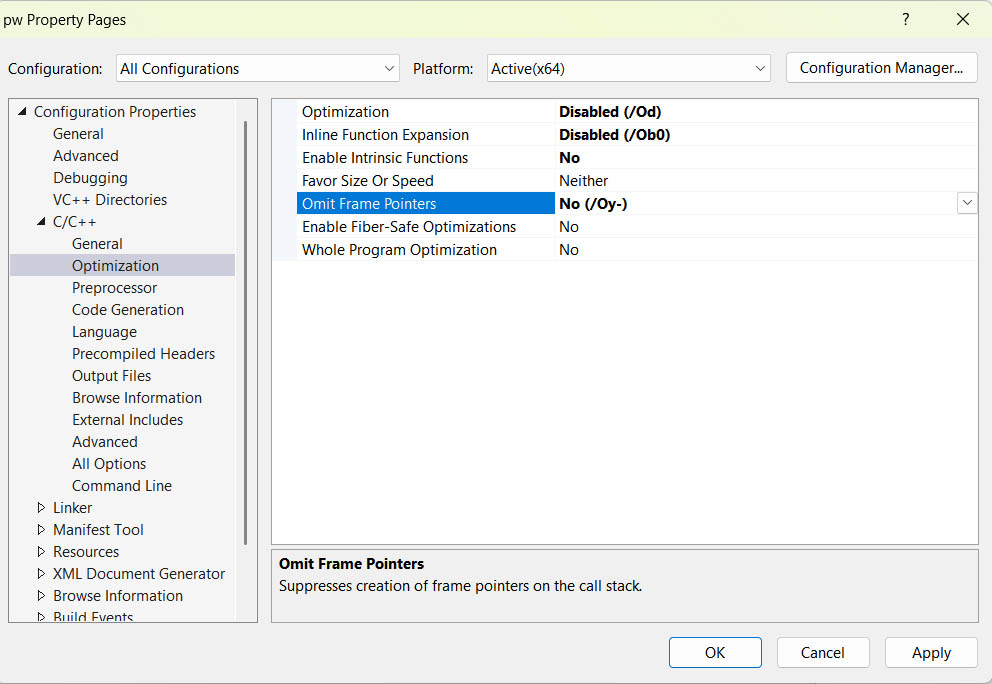
Step 2. Linker->Optimization. Set to following, then – Apply:
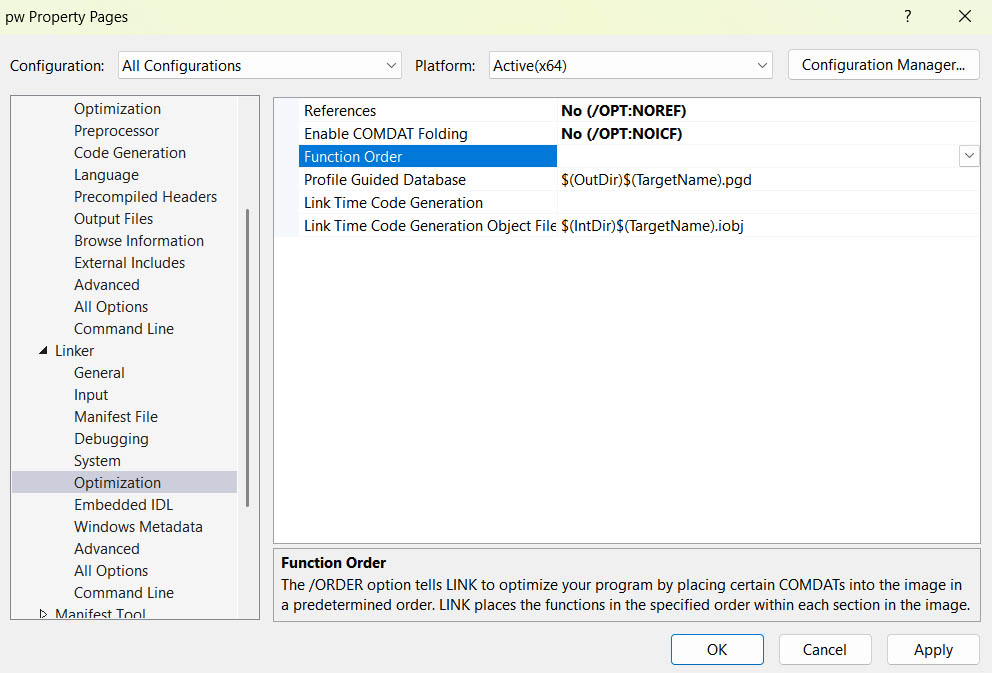
Step 3. Linker->Debugging. Set to following, then – Apply:
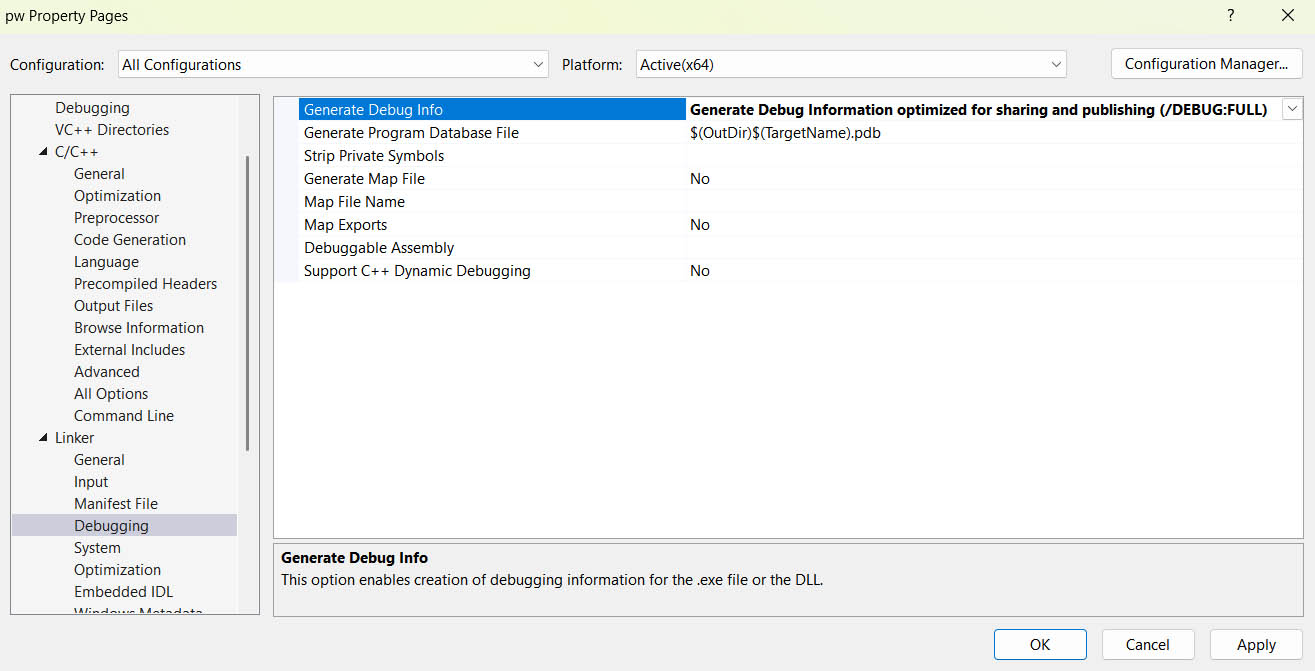
Step 4. C++->Code generation. Set to following, then – Apply:
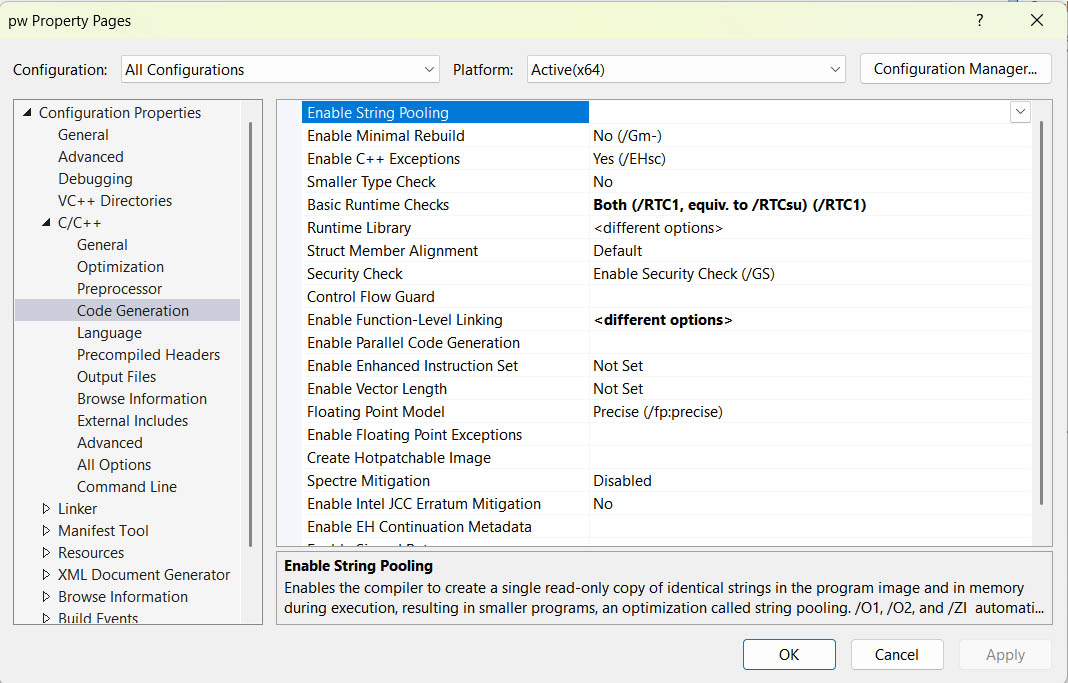
Now – Ok.
In my case EXE size TRIPLED, which suggests, that Visual Studio is more aggressive to your code than Android. Now size is 5MB, which is still not too bad for a 3D app, comparing to 100MB optimized “Hello World” in some commercial frameworks.
So, congratulations! You’ve successfully gotten rid of the uninvited guest.
While it’s unlikely it will resolve ALL crashes, I can promise you’ll get fewer, especially “ghost” ones.
Additionally, on both platforms, execution has become noticeably smoother, I would even say more “effortless.”